How this works
Everything here is somebody's own setup, posted so you can have it too. What it takes to move one into your game depends on which half of the site you are in. A HUD is several addons and several strings; a house is a single code and no addons at all.
 Housing blueprints
Taking a HUD layout
A layout here is the screenshot plus every import string needed to rebuild it, so you can have somebody's interface in a few minutes instead of an evening.
- Step 1
Find a layout
Filter by role, framework and game. Every entry leads with screenshots taken in game, at the resolution its author plays at, so you are judging the thing itself, not a description of it.
- Step 2
Install what it runs on
Each entry names its addons: ElvUI, WeakAuras, Plater, whatever it uses. Install those first. An import string has nowhere to go without the addon it came from, and this is the step that trips people up.
- Step 3
Copy the strings, paste them in
Every string sits behind a Copy button with its slash command and menu path beside it:
/ec→ Profiles → Import. They install independently, so you can take the whole setup or just the nameplates.
Rebuilding all of it at once
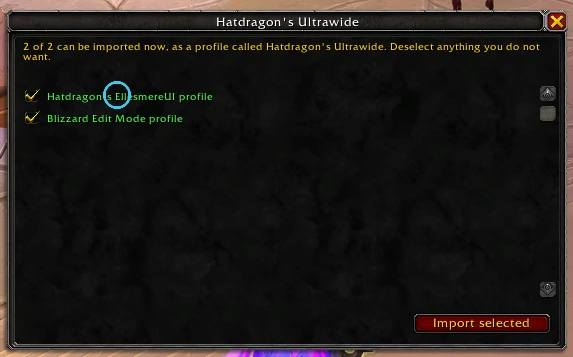
Copying eight strings into eight config panels is its own evening. Copy all puts the whole setup on your clipboard as a single line; paste that into /whh import and the companion addon hands each string to the addon it belongs to.
Tick only the rows you want before you copy. Pasting is what costs, because a large bundle locks the game up for the better part of a minute, and that is paid before the addon can offer you any choice, which is why the page shows you the size first.
Taking a housing blueprint
Importing needs no addon. Blueprints are a built-in game feature, and the code you copy from an entry is the same thing the game itself hands out. The companion addon is worth having anyway, because it is what puts a full parts list on an entry in the first place.
- Step 1
Find a build
Filter by full layouts, single rooms, interiors and exteriors. Housing is retail-only, but the game version still matters: decor arrives patch by patch, and a build made on a later one lists pieces an older client cannot place.
- Step 2
Read the parts list
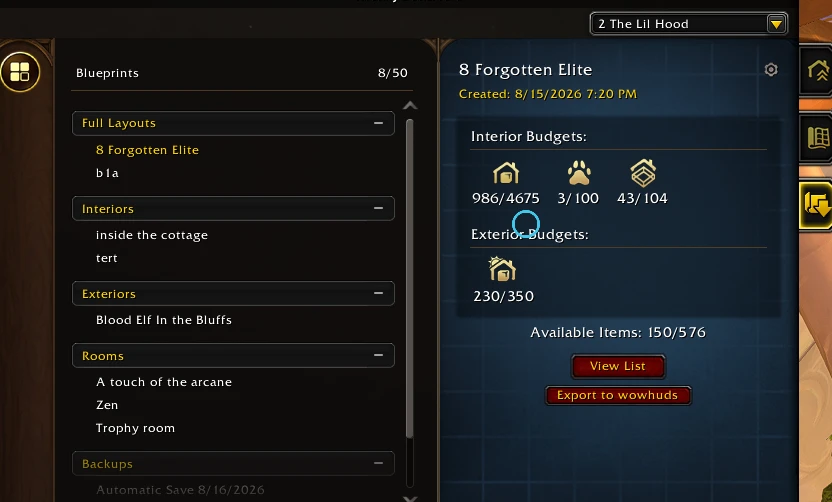
Where the author attached one, the entry lists every room, piece of decor, fixture and dye the blueprint places, and what it costs against each budget meter. It turns a screenshot into a shopping list.
- Step 3
Copy the code and import it
A blueprint code is short. It names a build held on Blizzard's servers rather than carrying it. Paste it into the housing editor and the game rebuilds the space.
You don't need to own it all
Decor and dyes you are missing will not stop an import. The game places what it can, reports the gaps, and shows you how far along you are before you commit. Only a short budget refuses outright. So a build you are still working toward is worth taking now.
This site deliberately does not guess at what you own. Your game client is the only thing that actually knows, and its own import preview answers it better than a web page could.
Where the parts list comes from
A blueprint code is opaque. It names a build on Blizzard's servers and says nothing about what is inside it, so an entry can only tell you what you are getting if its author exported one, either from the dashboard button below or with /whh housing. That is also the only place fixtures, dyes and the house type get named at all, since this site's catalog covers decor and rooms.
So the addon is optional for taking a build and recommended for posting one. The blueprint code rides along inside the same line, which makes it one paste instead of two.
The companion addon
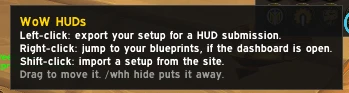
Optional: everything here works without it. It exists because a website cannot read your game and an addon cannot reach a website, so it meets them in the middle and hands you one line of text to carry across.
Getting a setup in
/whh import takes the line from a layout's Copy all and rebuilds what you picked, routing each string to the addon it belongs to.
Getting your own out
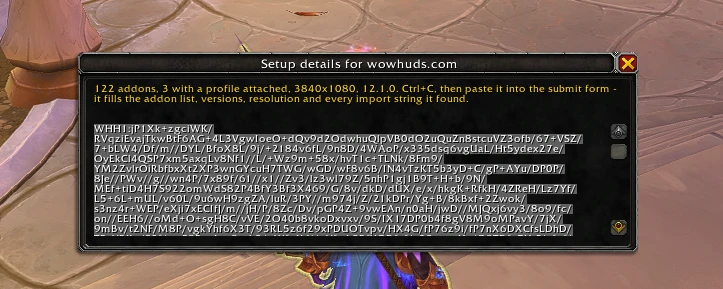
/whh hud reads your enabled addons, their versions, your resolution and each addon's own exported profile. Paste that into the submit form and it fills the requirement rows for you. For a house it reads the blueprint's parts list, meaning every room, piece of decor, fixture and dye, which nothing but the game can work out.
Posting your own
Sign in with Battle.net. No password, no email. Then screenshot the thing, attach what rebuilds it, and publish. You can save a draft and come back to it, and entries pass through moderation before they show up in a gallery.
A HUD
Screenshot your UI somewhere it is visibly working, then export a profile from each addon you rely on and paste the strings in. Or run /whh hud and paste one line, which fills the rows for you.
A house
Screenshot the space from the angles that sell it, save it as a blueprint in game and paste the code. The parts list is optional. The addon can read it, and it carries the blueprint code along with it, so one paste does both jobs.